For shops that print their own work

See the sheet before the press does.

PostPress Studio is the layout and hand-over desk that sits beside your press. Lay a job out, see exactly what the press will receive, and send it only when you are satisfied. One kit for every installation.

The download is free to take. Studio asks for a licence file the first time it opens, and we issue those. Windows only. How to open it.

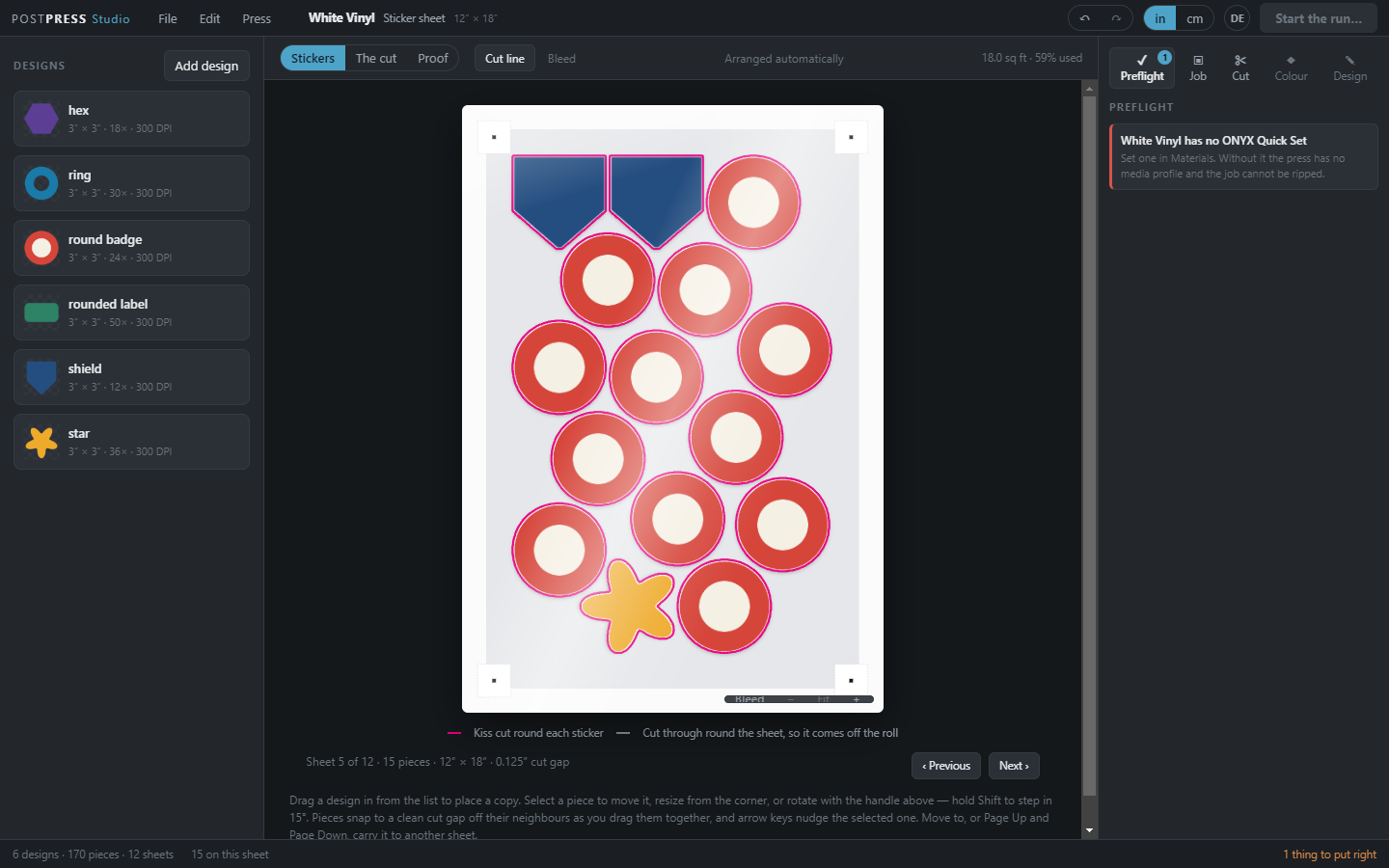
PostPress Studio: six demo sticker designs nested by their cut lines on one sheet, with the preflight beside it
A demo sticker run, nested by shape. The preflight on the right holds the sheet until the stock has a Quick Set.

What it does

A preflight that stops what should stop

Every sheet is checked before it can be sent. A stop is something the press cannot make, or would make differently from the preview, and it turns sending off; a look is a judgement call left to you. Every finding says how to fix it.

Send to press shows you everything

Sending opens one screen with the file name, the folder it lands in, every page and every separation, and the press button is on that screen. A RIP prints a separation it does not recognise as ink, so this is where a cut line is kept off the print.

Nest by the shape, and see the sheets saved

Pieces are packed by the line the blade follows, not the box round them, so shaped stickers interlock. When that beats laying them out in rows, Studio tells you by how many sheets.

A day's work, in order

Work is grouped into runs of one press, one roll, one Quick Set and one finish, and ordered so the roll comes off as few times as it can without printing Thursday's work before Tuesday's. Each material carries the Quick Set it rips with.

Studio hands each sheet to the RIP the shop already owns, ONYX, Caldera or Fiery XF, by writing it into the folder that RIP watches. It never starts, stops or reorders anything on the RIP.

In development

These are being built. None of them is in Studio today, and a contract signed now does not depend on them.

A cloud RIP

Studio's own RIP, run in the cloud for each contract. Until it exists, Studio hands every job to the RIP the shop already owns, as it does today.

A profile library

Media profiles that arrive with the printer, so a new stock does not start from nothing. A shop's own measurements and presets always win over the library's.

Shared presets

A company's own presets and materials, set up once and shared across its sites.

Who it is for

Companies printing their own work on their own presses. There is no checkout here, and nothing to pay to download it: ask us for a licence.

EnterpriseOffered now

A contract for a company printing its own work on its own presses. The number of people who sign in is agreed with us, and Studio goes on as many of the company's computers as it needs.

Contact us for a licence key
IndividualLater

Studio for one person printing on their own. Not offered yet. Tell us you want it.

PostPress Studio 0.1.1, early build

Early buildVersion 0.1.1Windows onlyA zip, 116 MB

This is an early build, for partners testing Studio with us. The finished release replaces it on this page when it is published.

Start a job with a job number and a company, shown on every board. One Press screen follows work from waiting to printed, goes full screen, and Stopped asks why. Drag a box to choose several stickers and move them together. The Cut tab says where a cut line came from. A screen that stops drawing says your job is safe. A copy from an early 0.1.0 kit also gains the licence check.

  1. Right-click the zip, Extract All, into a folder you own (the Desktop is fine, not Program Files).
  2. Open the folder inside and double-click PostPress Studio.exe.
  3. If Windows says it protected your PC, click More info, then Run anyway. Studio is not code-signed yet; nothing is wrong with it.
  4. Studio asks for your licence file. Drag it onto the box it shows.

Updates arrive inside Studio, signed by us. Nothing installs that we did not publish. An early build takes stable updates until it is told otherwise: to be offered the next early build, a supervisor chooses test updates under This installation… in the profile menu.